Your iPhone, beside your Mac.

Sidekeys turns your iPhone into a second screen for your Mac, and a control deck that knows what you're doing.

I'd test on

Get early access before Sidekeys reaches the App Store. Built for iPhone Duo, works with any iPhone or iPad.

One app, three jobs

More room. Fewer shortcuts to remember.

01 · Second screen

A second screen for your Mac.

Plug in your iPhone and your Mac gets a new display. Drag windows onto it, touch to click, scroll with two fingers, and type with the on-screen keyboard.

It's built for iPhone Duo's big inner screen, and it works on any iPhone or iPad.

Sharp Retina picture

Edge to edge, with your Mac's menu bar fully visible.

Low latency over USB‑C

One cable between your iPhone and your Mac.

Rotates with you

Rotate your phone and your Mac's display rotates with it.

Windows land where you are

New windows you open from the phone land on the phone.

Pinch to zoom

Zoom in on small text, right on the phone.
02 · A deck for every app

Keys that change with what you're doing.

Sidekeys shows keys for the app in front on your Mac: Xcode, Final Cut Pro, Figma, VS Code and more. One tap runs the shortcut you'd otherwise have to remember.

In a Zoom, Google Meet, Microsoft Teams or Slack call, the deck switches to big mute, camera and leave buttons that work even while the meeting window is buried behind your work.

Frontmost: Final Cut Pro

  • PlaySpace
  • Mark InI
  • Mark OutO
  • BladeB
  • Undo⌘Z
  • Export⌘E
  • Full Screen⇧⌘F
  • Scrub

Illustration. On your phone, the deck switches by itself.

03 · Your AI agents, at a glance

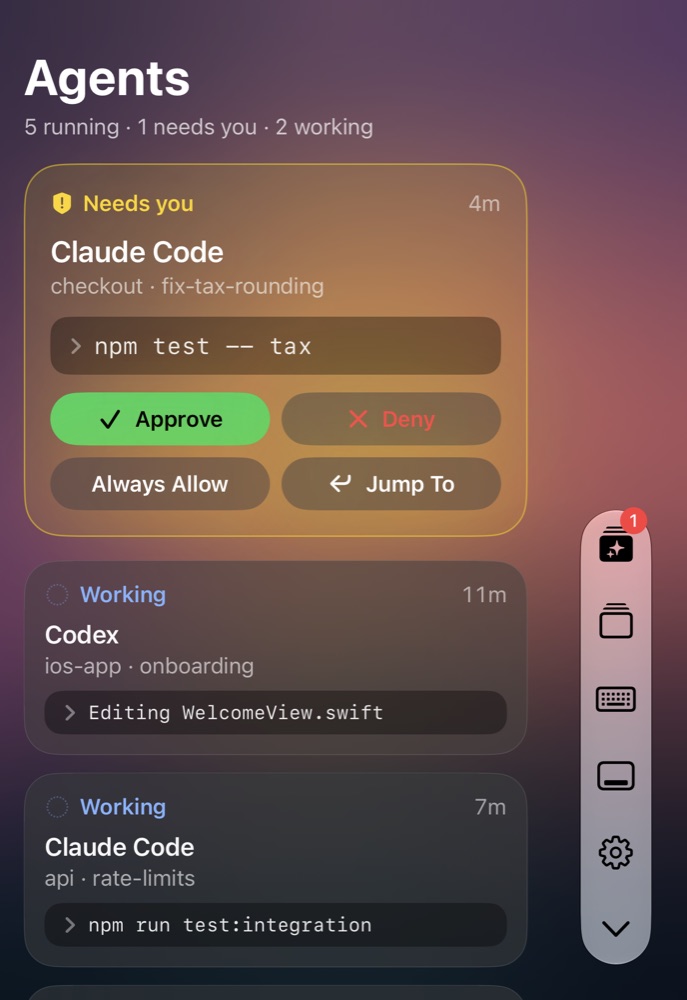
See which agent needs you.

Running coding agents in the terminal? Sidekeys shows each one as a card: what it's working on, what finished, and what's waiting on you.

Approve a request or jump to its window with one tap.

The Sidekeys agent board on iPhone Duo. A Claude Code card marked “Needs you” asks to run npm test, with Approve, Deny, Always Allow and Jump To buttons. Below it, two more agents are listed as working.

Built for iPhone Duo

Sidekeys uses the iPhone Duo's vertical toolbar, fills the inner screen edge to edge, and works on the outer screen too.

How it works

Set up in a minute.

  1. Download the Mac app

    Get the free Sidekeys app for Mac from sidekeysapp.com/mac, and Sidekeys for iPhone from the App Store.

  2. Plug in your iPhone

    Connect your iPhone to your Mac with a USB-C cable and open Sidekeys.

  3. That's it

    Your iPhone is now a display and a deck.

Pricing

Pay once. Keep it.

$9.99once

Try everything free for 7 days. After that, unlock Sidekeys once for $9.99.

  • No subscription
  • No account
  • Family Sharing included
  • Mac app is free

Buy here or in the app, same price. A web purchase gives you a code that unlocks up to 5 of your devices.

Questions

Which iPhones does it work with?

Sidekeys is built for iPhone Duo's big inner screen, and it works on any iPhone or iPad. On iPhone Duo it also works on the outer screen.

Cable or Wi-Fi?

Either. A USB-C cable gives the lowest delay; use one that carries data, not a charge-only one. Over Wi-Fi, pair once (plug in the cable once, or type the code your iPhone shows), and from then on your iPhone connects on its own whenever Sidekeys is open nearby. Wi-Fi connections are encrypted end to end between your two devices.

Which Macs are supported?

A Mac with Apple silicon running macOS 27 or later, with the free Sidekeys app for Mac installed. Download it here.

The Mac app isn't on the Mac App Store because it creates a virtual display, which the Mac App Store doesn't allow. It's notarized by Apple and downloads straight from this site.

Is it a subscription?

No. Try every feature free for 7 days, then unlock Sidekeys once for $9.99. No subscription, no account.

Can my family use it?

Yes. The unlock works with Family Sharing, so people in your Apple Family Sharing group can use it too.

What happens to my data?

Nothing leaves your devices. Your screen, touches and typing go directly between your iPhone and your own Mac. Sidekeys collects no data and has no analytics, ads or accounts. Read the privacy policy.

Give your Mac a sidekick.

Be one of the first to try it. We'll email your TestFlight invite.

I'd test on